Sign In

dWell-KC  ·  Shelter Management

Shelter management
that just works.

Track every bed, check clients in with one tap, and let connected agencies start the housing pipeline directly from your shelter roster — no phone tag, no spreadsheets.

One-tap check-in & check-out Live bed-by-bed occupancy Agency-direct onboarding QR intake for walk-ins Full stay history per client Behind-the-scenes HMIS tracking
dwell-kc.org/shelters/hope-house
Shelter summary dashboard

At a Glance

Your whole shelter,
on one screen.

The shelter dashboard shows current occupancy, available beds, and tonight's roster the moment you open it. No refreshing, no digging — just the numbers you need at a glance.

  • Live occupancy count and bed availability
  • Tonight's roster with check-in timestamps
  • Trend view of stays over time
  • Multi-room and multi-wing support
dwell-kc.org/shelters/hope-house/check-in
Shelter client search and check-in

Check-In

Find any client.
Check them in instantly.

Search by name, pull up their profile, and check them in — all in under ten seconds. No duplicate entry, no paper sign-in sheets. The same client record your partner agencies already use.

  • Name search across all connected clients
  • One-tap check-in from any client's profile
  • Automatic timestamp and stay duration
  • Identity verified against existing records
dwell-kc.org/shelters/hope-house/beds
Shelter bed management

Bed Tracking

Know exactly which
bed is available.

Every bed has a name, a room, and a status — occupied, available, or reserved. Assign a client to a specific bed on check-in and free it on check-out. Night staff always knows the true count without calling anyone.

  • Bed-level view with room and wing grouping
  • Current occupant shown per bed
  • Available beds highlighted in real time
  • Inventory reports for funding compliance

Agency Connection

Agencies don't wait.
They act.

When a client checks into your shelter, every connected agency that works with that client sees it instantly in their dashboard. They can start the housing pipeline, open a case, and kick off onboarding — all without calling your front desk.

  • Agency case managers see their clients' shelter stays in real time
  • One click starts the housing onboarding process directly from the shelter record
  • Shared client profile means no re-entry of demographics or history
  • Case notes, goals, and pipeline progress carry over automatically
  • Notifications alert the assigned case worker the moment a client checks in
Agency Dashboard

Case managers see shelter check-ins in their client activity feed the moment they happen.

Start Onboarding

Launch the housing onboarding workflow directly from the shelter stay record — no switching tools.

Shared Client Record

Demographics, history, and intake data transfer automatically — no re-entry for shelter or agency staff.

Instant Alerts

Assigned case workers get notified the moment their client checks in, so they can follow up while the client is present.

QR code intake forms

Walk-In Intake

Put a QR code on the
front desk. Done.

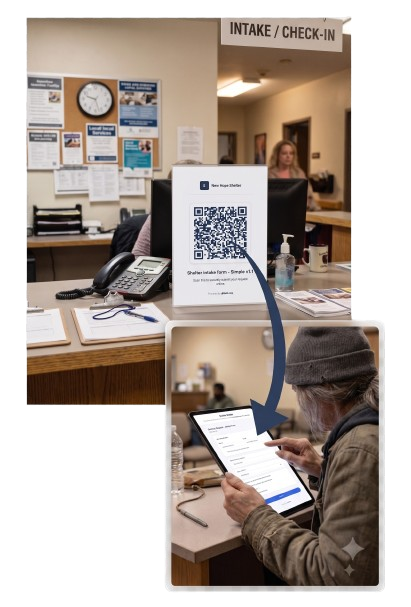
Create a custom intake form in minutes, generate a QR code, and print it. Walk-in clients scan it on their phone and fill it out themselves — no staff time required. Responses flow directly into the client record and trigger onboarding automatically.

  • Printable QR code for your lobby or front desk
  • Clients fill out the form on their own phone
  • One-click convert response to a new client record
  • Automatically enroll in onboarding pipeline
  • Send form link by text or email to an incoming guest

Everything shelter staff actually needs.

Built for the pace of shelter work — not for administrators who've never worked a front desk.

One-Tap Check-In
Check any client in or out in seconds. Pulls name, photo, and history automatically.
Live Bed Availability
Real-time grid of every bed — occupied, available, or reserved — with assigned guest shown.
Stay History
Complete check-in/check-out history per client, including duration and staff who logged it.
Agency Connection
Connected agencies see shelter stays the moment they happen and can start housing onboarding directly.
QR Walk-In Intake
Print a QR code. Clients fill out intake themselves. Response converts to a client record in one click.
In-App Messaging
Message the client's case worker directly from their shelter profile without leaving the app.
CH Assessments
Administer VI-SPDAT / Chronically Homeless assessments right from the shelter check-in flow.
Identity Deduplication
SHA-256 identity matching prevents duplicate records across every connected agency on the platform.
Occupancy Reporting
Nightly census reports, length-of-stay averages, and turnover rates ready for grant reporting.
Case Worker Alerts
Assigned case workers get notified the moment their client checks in so they can follow up immediately.
Intake & Exit Documents
Attach intake forms, consent documents, and exit surveys directly to each shelter stay record.
Mobile-Optimized
Fully usable on a tablet or phone at the front desk — no app install required, just a browser.
Behind-the-Scenes HMIS
Every shelter stay automatically captures HUD-required data points in the background — so your HMIS records stay current without any extra steps from staff.

Ready to simplify your shelter?

Set up your shelter in minutes. Connect to partner agencies. Let your team focus on people — not paperwork.